#238 Possible to draw from more than one category?

Posted in ‘Calendar Filter’
This is a public ticket

Everybody will be able to see its contents. Do not include usernames, passwords or any other sensitive information.

Environment Information (available for public)

Joomla version:
n/a
PHP version
n/a
Calendar Filter version
n/a

Latest post by sulpher on Tuesday, 20 October 2026 23:51 EEST

acausade

Hi - using your wonderful calendar filter for a large client site - a national library -  to show upcoming events. Works perfectly and so glad it saves me from installing jevents.

The library has requested that the calendar also shows news. Is it possible for the calendar to show items from 2 categories (in my case news and upcoming events) with each possible marked with a different colour/class?

Thanks in advance!

Andy

sulpher

Hi Andy,

Thanks for your question.

Calendar Filter operates with core Joomla functionality which does not support multicategories yet.

However, there is a little trick which you can use right now - subcategories.

E.g. you can create the following structure of categories inside Joomla:


Library (parent category)

   - news (child)

   - upcoming events (child) 


As the result, you can create a new menu item "blog category" and choose parent category and set up menu item allowing to display content from subcategories.

This appropach can help you to resolve yout task.


Best regards,
Eugene

b2z

Hello!

Alternatively you can display two modules with two different default categories.

Kind regards,

Dmitrijs

sulpher

HI Andy,

Please post messages on the forum (not as reply on email notification). It helps to keep the discussion actual.

Please have a look at the demo:

https://joomla.norrnext.com/calendar-filter 

There are Subategory 1 and Subcategory 2 categories in the blog category. 

Probably you need to show articles in the parent category.

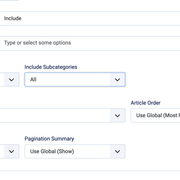
Menu item > Blog layout tab > Include Subcategories > All

Snimok-ekrana-2026-10-14-v-11-10-14

acausade

Hi Eugene,

I think I have the settings correct in the Category Blog menu item.

The problem seems to be that the calendar isn't marking dates when the articles are in subcategories.

For example, I have an event on 9 December 2026. When the module's Default Category is set to the parent category, the calendar doesn't highlight the date, and the HTML doesn't indicate that an article exists on that date:

<div class="vc-date" data-vc-date="2026-12-09" data-vc-date-month="current" data-vc-date-week-day="3" role="gridcell">
    <button class="vc-date__btn" type="button" aria-label="9 декември 2026 г." data-vc-date-btn="" tabindex="-1">9</button>
</div>
However, if I click on 9 December anyway, the event article appears correctly on the Category Blog page.

If I change the module's Default Category to the specific child category containing the event, the calendar correctly recognises the date, and the HTML includes:

<div class="vc-date" data-vc-date="2026-12-09" data-vc-date-selected="" aria-selected="true">
It also generates the article title in the aria-label and the corresponding vc-date__popup containing the article link.

So the date filtering itself seems to work correctly, but the calendar doesn't appear to identify articles within subcategories when the parent category is selected.

Is there another setting I might have missed?

Thanks,
Andy

sulpher

Andy,  

Thank you for reporting. We will investigate this case and let you know.

b2z

Hi Andy,

Just to confirm - are you talking about filtering by custom fields?

Kind regards,

Dmitrijs

b2z

Do you have "Include Subcategories" set to "All" in the menu item options? If not set then the days from subcategories wont' be displayed.

Kind regards,

Dmitrijs

acausade

I am filtering by category - it is parent category. Yes menu settings include subcategories set to all

b2z

I got it. When module is published outside of the content category then the subcategories option does not resolve. I am already working on improvement. Need to add subcategories option to module settings.

Kind regards,

Dmitrijs

b2z

Andy,

Just have released version 1.3.2 with this improvement. Please update and set in the module settings "Include Subcategories" to "All". It should resolve your case.

Kind regards,

Dmitrijs

acausade

Thanks for the lightening quick update to the extension - yes, it now shows dates with both sub categories.

Just one extra question/request that is linked tio this:

Is it at all possible to add a class or attribute to the div or button that comes from the category? So i can style each date with a red circle for example if news and a blue circle if from events - and if a date has both an event and a news i can add a little blue and red circle.

A bit like you have 'data-vc-date-week-day="0" or 'data-vc-date-weekend'

Thanks again for all your excellent support and improvements!

Andy

b2z

Hi Andy!

We have implemented this feature! In the upcoming 1.3.3 release, each date cell (div) and its button automatically receive category metadata based on the articles for that day:

  • Attributes: data-cfilter-categories="news events" and data-cfilter-catids="12 34"
  • CSS Classes: .cfilter-cat-<alias> and .cfilter-catid-<id>

For example you can style them in your template's using modern CSS outlines (box-shadow). Here is the recommended snippet:

/* Ensure date buttons stay nicely separated */
[data-vc-date] {
  padding: 2px !important;
}

[data-vc-date-btn] {
  position: relative;
  border-radius: .5rem !important;
}

/* News only: Red outline */
[data-cfilter-categories="news"][data-vc-date-btn],
.cfilter-cat-news:not(.cfilter-cat-events)[data-vc-date-btn] {
  box-shadow: inset 0 0 0 2px #ef4444 !important;
}

/* Events only: Blue outline */
[data-cfilter-categories="events"][data-vc-date-btn],
.cfilter-cat-events:not(.cfilter-cat-news)[data-vc-date-btn] {
  box-shadow: inset 0 0 0 2px #38bdf8 !important;
}

/* Both News and Events on the same date: Dual concentric outline */
.cfilter-cat-news.cfilter-cat-events[data-vc-date-btn],
[data-cfilter-categories~="news"][data-cfilter-categories~="events"][data-vc-date-btn] {
  box-shadow: inset 0 0 0 2px #ef4444, inset 0 0 0 4px #38bdf8 !important;
}

(Replace news and events with your actual category aliases or use .cfilter-catid-XX with your category IDs).

Kind regards,

Dmitrijs

b2z

Released 1.3.3

acausade

Brilliant. Thanks Dmitrijs!! All works perfectly!

sulpher

Hi Andy,

It is great the new version could resolve your needs.

We would be grateful if you will leave a short review about Calendar Filter at the JED or on TrustPilot.

Thanks

Support information

Support hours: You can get our help: Monday - Friday / 09:00 to 17:00 (GMT+3), but not limited. Our staff is pleased to provide Premium support to every paid subscriber asap, but sometimes you should be ready to wait for our reply for up to 3 days.


Our time: / Your time:

Support policy: We would like to kindly inform you that when using our support you have already agreed to the Support Policy which is part of our Terms of Service. We also ask you to remove temporary credentials at your site after the problem is resolved. Thank you.

Support of free extensions is not provided on this forum. Please submit your questions or report issues via Github tracker. See link on the product page.